


Cute Lock Screen & Wallpapers
Prometheus Interactive LLC
I spent time with Cute Lock Screen & Wallpapers as a small personalization app rather than treating it like a full phone makeover. Its appeal is easy to understand: it gives an Android phone a cheerful lock-screen identity, adds a privacy layer, and leans into short, funny quotes instead of trying to look serious or luxurious. That combination makes it particularly approachable if you want your phone to feel more personal without rebuilding every icon and widget.
The app is published by Prometheus Interactive LLC and sits in the beauty and personalization space. It is free to install, suitable for Everyone, and has reached over 10 million installs. Those figures suggest that it has found a broad audience, but popularity is not the same as a perfect fit. In my experience, its strongest use is for someone who wants a quick visual change and enjoys cute, expressive designs. It is less convincing for people who want a highly technical lock-screen replacement, deep system integration, or a completely distraction-free screen.
How Cute Lock Screen & Wallpapers feels today
The first thing I noticed is that the app is built around mood. The lock screen is not merely a blank security gate; it becomes a little greeting every time you wake the phone. The funny-quote approach gives the experience more personality than a standard wallpaper, while the cute styling keeps it light rather than turning the screen into something overly dramatic.
That focus is useful because lock-screen customization can easily become complicated. Many wallpaper tools offer huge libraries but leave you to manage cropping, placement, clock visibility, and the phone’s own security settings. Here, the central idea is much narrower: choose a look that suits you, apply it, and let the phone feel different immediately. I appreciate that simplicity when I am customizing a device I use constantly but do not want to spend an evening redesigning.
The privacy angle also matters. A customized lock screen can make the phone look more finished, but it should still support the basic purpose of keeping casual viewers away from the device. I would not treat the app as a replacement for the secure method already built into the phone. Instead, I see it as a visual layer around that protection. If you use a PIN, pattern, password, or biometric unlock, keep that system enabled and think of the app as the presentation around it.
Latest News

Uber Eats Under Pressure: What Happens When Delivery Goes Wrong

How QR & Barcode Scanner Adapts to Android and iOS Innovations

Why Waze Navigation & Live Traffic Is Your Essential Travel Companion

CapCut Mastery: Unleash Hidden Features for Pro-Level Editing

How OS Updates Enhance Roblox Adventures

Teacher Simulator: Exam Time Turns Quick Classroom Judgments into a Repetitive Loop
One practical point is worth remembering: Android lock screens can behave differently depending on the phone maker, system version, and the security settings already active. A design that looks balanced on one handset may place the clock or notifications differently on another. That is not a reason to dismiss the app, but it does mean I would test the result with a few ordinary actions—locking the phone, waking it, receiving a notification, and unlocking it—before deciding that a particular style works perfectly.
A playful alternative to ordinary wallpaper apps
Compared with a typical wallpaper application, this one has a more defined purpose. Standard wallpaper apps are usually better when I want a landscape image, an abstract background, or a picture I already own. Cute Lock Screen & Wallpapers is more suitable when the lock screen itself is the main event and I want a friendly quote or decorative treatment to greet me there.
It also differs from a complete launcher. A launcher can change the home screen, icon arrangement, app drawer, gestures, and sometimes widgets. This app should not be chosen with that expectation. Its value is in the lock-screen experience, not in replacing the entire Android interface. That narrower scope is actually a strength for users who like their current launcher and only want to refresh the first screen they see.
Gallery
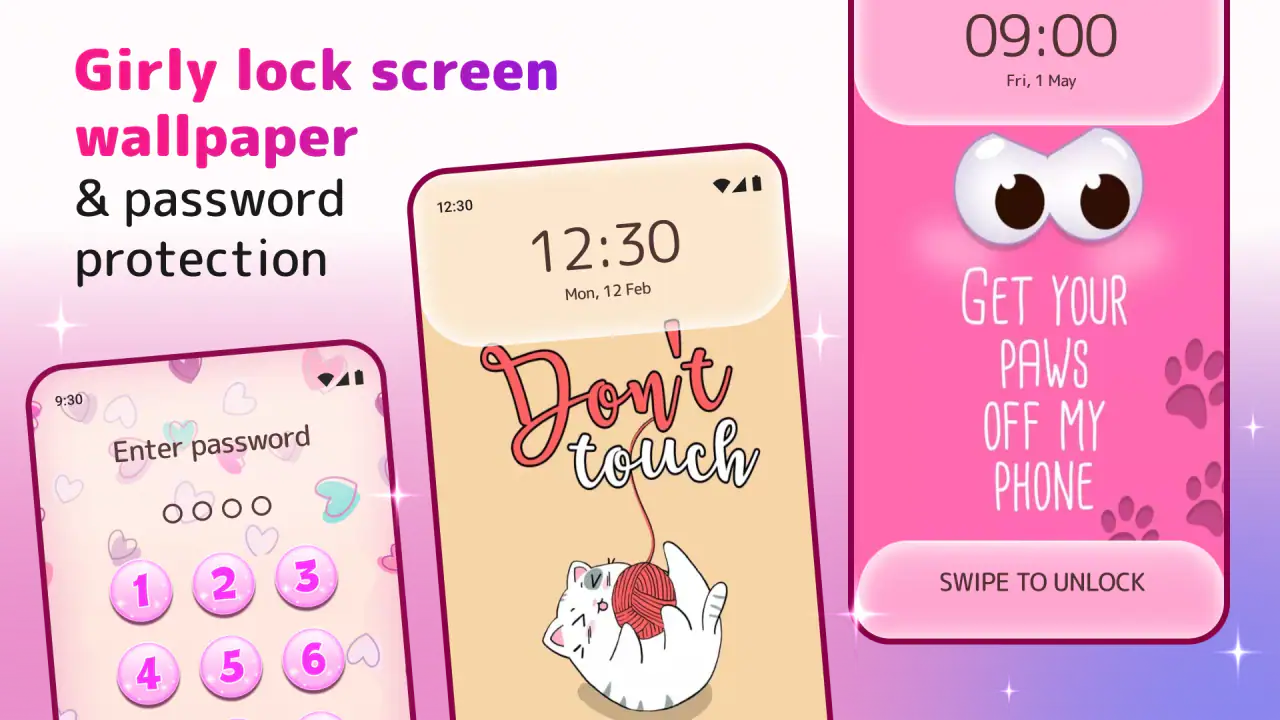
I would also place it between two extremes. On one side are minimal wallpaper tools that barely affect the phone beyond the background. On the other are elaborate customization suites that can require considerable setup. This app offers a quicker, more expressive middle ground. The trade-off is that anyone seeking precise control over every visual element may eventually find the experience limited.
What the current version tells me about its direction
The current version is 5.1.0, and the app was released on October 24, 2017. That history gives the product a useful sense of maturity: it is not a brand-new experiment, and the large install base shows that the basic concept has remained relevant. At the same time, an older product with a long life has to keep adapting to changing Android behavior, different screen shapes, and manufacturer-specific lock-screen rules.
I would read the current release as evidence of continued maintenance rather than proof that every part of the experience has been transformed. The important question for an existing user is not simply whether the version number is higher. It is whether the app still applies its visual treatment reliably, behaves sensibly alongside modern phone security, and avoids making a simple customization task feel like ongoing maintenance.
For someone who has used earlier versions, the most meaningful improvement is likely to be stability and compatibility rather than a completely different idea. The core identity remains clear: cute visuals, humorous wording, and a lock screen that feels more personal. That continuity is helpful if you already like the style, because you are not learning an entirely new product just to keep the same kind of experience.
New users should still approach updates with realistic expectations. A version change can improve the way an app works on current Android devices, but it cannot guarantee that every manufacturer treats a custom lock screen in exactly the same way. I would install the latest available version for compatibility, then judge it on the particular phone I use rather than assuming another user’s result will be identical.
How I would set it up for everyday use
My preferred workflow is deliberately cautious. I first choose a design that remains readable when the phone is viewed quickly. A quote may look charming in a preview, but a busy background can compete with the clock, notification text, or fingerprint area. I then lock and unlock the phone several times, checking whether the visual elements remain comfortable in both bright and dim conditions.
A second useful check is notification privacy. A decorative lock screen can make the device more enjoyable, but notifications may still reveal information depending on the phone’s own settings. If the device is often left on a desk or passed around, I would review Android’s notification visibility controls separately. The app can change the appearance of the screen; it should not be assumed to decide what sensitive message content is exposed.
There is also a simple battery-and-habit consideration. Because this is a lock-screen customization tool, I would avoid repeatedly switching designs just for novelty. Pick one that works with your daily routine, especially if you rely on the lock screen to check the time or glance at notifications. The best result is not necessarily the most decorated one; it is the design that stays readable after the initial excitement wears off.
For a teenager or anyone sharing a phone with family, the humorous style can make the device feel more individual without changing how the rest of Android works. For a work phone, I would be more selective. A cute quote may be perfectly fine for a personal device but feel out of place during a meeting. The app is strongest when its tone matches the owner and the setting.
Where existing users may notice friction
The biggest limitation is the same thing that makes the app distinctive: the style is specific. If you enjoy cute graphics and playful language, that focus is welcome. If you prefer neutral photography, clean typography, or a professional appearance, the app may feel too narrow even when it functions correctly. I would not recommend it simply because someone wants “a better lock screen”; I would recommend it when they want this particular personality.
Another possible source of friction is the boundary between the app’s design and the phone’s built-in lock screen. Android manufacturers can place their own controls, shortcuts, clocks, and notification behavior on top of or around customization features. That can make the final result less consistent than the preview. The practical solution is to test the design on your actual device and keep your normal security method active rather than relying on appearance alone.
The free price makes trying it easy, but in-app purchases range from $0.99 to $99.99 per item. That wide range is something I would keep in mind before tapping through optional purchase screens. The app can be explored without an upfront charge, yet “free” does not mean every possible customization is included at no cost. I would decide in advance whether a particular design is worth paying for and avoid treating every attractive option as necessary.
That purchase structure also affects who should skip the app. If you want a completely open-ended customization library with no pressure to consider extras, a simpler wallpaper tool may be more comfortable. Likewise, users who only need a secure lock screen and do not care about decoration have little reason to add another layer. The app earns its place when the visual experience matters to you.
Who gets the most from it
I think it is a good match for people who want a quick personality boost on Android. It works especially well for someone who changes wallpapers with their mood, likes short jokes or affirmations, and wants the lock screen to feel more inviting than the default system view. It can also suit a user who likes the current home-screen layout but finds the lock screen bland.
A realistic everyday example would be a student who keeps the same phone for school, messaging, music, and photos but wants a small change at the start of a new term. Instead of reorganizing apps or installing a launcher, they can use a playful lock-screen style, check that notifications remain private, and keep the rest of the device untouched. That is exactly the kind of low-effort personalization where this app makes sense.
I would be less enthusiastic for a photographer who wants a carefully framed personal image, a business user who needs a restrained presentation, or an Android power user who expects extensive widget and gesture controls. Those users may be better served by the phone maker’s own lock-screen tools, a dedicated wallpaper app, or a full launcher, depending on what they want to change.
The Everyone age rating makes the app broadly approachable, but the tone still matters more than the label. Parents choosing it for a child should look at the actual designs and quote style together with the child’s preferences. Adults can use it too; the cute presentation is not limited to one age group, although it will naturally appeal most to people who enjoy that aesthetic.
Small decisions that improve the experience
My first tip is to judge a design at arm’s length, not only in the selection screen. Lock screens are viewed quickly, often outdoors or while moving. A background that looks detailed and attractive up close may make the clock hard to read in normal use. I would choose contrast and legibility over decoration whenever the two conflict.
My second tip is to separate security from style. Keep the phone’s established unlock protection, then use the app for appearance. If the device is lost, a cute design is not protection. This distinction is easy to overlook because the app presents privacy and personalization together, but the safest setup is one where the visual layer never replaces secure device settings.
My third tip is to check the lock screen after changing notification preferences. A design may be excellent while the notification preview is too revealing, or the opposite may be true. Adjusting Android’s own notification display can make the app far more practical in public places, especially if the phone is regularly left visible.
A fourth trade-off is choosing consistency over constant switching. If you change styles every day, the novelty can become another task. I get more value from selecting one that matches the phone case, wallpaper colors, and personal taste, then leaving it in place until I genuinely want a new mood. That approach also makes it easier to notice whether the app remains reliable over time.
What I would watch before recommending it widely
I would watch how the app continues to handle newer Android versions and the growing variety of display formats. A lock-screen design has to coexist with different camera cutouts, aspect ratios, notification layouts, and manufacturer interfaces. Continued compatibility is more important here than adding endless decorative choices, because a beautiful design is not useful if it is awkward on the actual device.
I would also pay attention to how optional purchases are presented. The free entry point is appealing, and the app’s basic idea is easy to understand, but users should be able to tell which choices are included and which require payment before committing to a particular look. Clear expectations would make the experience feel more relaxed, especially for younger users and anyone trying the app casually.
Finally, I would look for improvements that preserve the app’s personality without making it heavier. Better control over readability, more dependable behavior alongside built-in security, and smoother handling of notifications would be more valuable to me than turning it into a full launcher. Its identity works because it stays focused. Expanding too far could weaken the simple reason people install it.
My verdict after using it
Cute Lock Screen & Wallpapers is a focused beauty app for Android that makes the lock screen feel cheerful, personal, and a little less ordinary. Its 4.4 average from around 71 thousand ratings shows that many users respond well to that idea, and I can see why: the app offers an obvious visual payoff without requiring a complete phone redesign.
I recommend it to anyone who genuinely likes cute themes, funny quotes, and quick personalization. I would install it for a personal phone, test the result against my device’s notifications and security settings, and be selective with optional purchases. I would skip it if I wanted a professional minimalist lock screen, a personal photo gallery, or deep launcher-level control.
My bottom line is simple: choose it for personality, not for advanced system control. Used that way, the app does its job well. It adds a small moment of character every time the phone wakes, while the current 5.1.0 release suggests a product that has continued moving forward from its original launch. Just keep your expectations realistic, protect the device with Android’s proper security tools, and remember that the best lock screen is the one that remains pleasant and readable after the novelty fades.
FAQs for Cute Lock Screen & Wallpapers
What features does Cute Lock Screen & Wallpapers offer?
Cute Lock Screen & Wallpapers provides a variety of customizable options, including a wide selection of adorable wallpapers, pattern and PIN lock security, and widgets for quick access to essential apps. Users can explore themes and personalize their lock screen with ease, combining aesthetics with functionality.
Is Cute Lock Screen & Wallpapers secure to use?
Yes, Cute Lock Screen & Wallpapers prioritizes user security by offering multiple lock mechanisms such as pattern, PIN, and password protection. These features help ensure your device remains safe from unauthorized access while maintaining a cute and personalized appearance.
Does Cute Lock Screen & Wallpapers affect battery life?
While Cute Lock Screen & Wallpapers is designed to be efficient, some users might notice a slight increase in battery usage due to the dynamic wallpapers and widgets. However, the app is optimized to minimize its impact on battery life, ensuring a balanced experience between functionality and power consumption.
Can I use my own images with Cute Lock Screen & Wallpapers?
Yes, the app allows users to customize their lock screen with personal photos. You can easily upload images from your gallery and use them as wallpapers, providing a truly personalized experience. This feature is great for those who want to display cherished memories or favorite images.
Is Cute Lock Screen & Wallpapers free to download and use?
The app is available for free download, offering a range of features at no cost. However, there may be in-app purchases that provide additional themes or premium features. Users can enjoy the basic functionalities without payment, but optional purchases are available for those seeking more customization.
Pros
- Wide variety of cute themes available.
- Easy to personalize lock screen settings.
- High-quality wallpaper resolution.
- User-friendly interface design.
- Regular updates with new content.
Cons
- Contains in-app advertisements.
- Limited free content options.
- Occasional app crashes reported.
- Some themes require purchase.
- Battery usage can be high.


